Stop Waiting for Googlebot.
Force Instant Crawling.
The smarter Rank Math instant indexing alternative. Built with a background queue to protect your API limits and native OpenSSL to eliminate WordPress bloat. Instantly ping Google the second you hit publish.
100% Open Source & Secure • Works alongside Yoast, Rank Math & SEOPress
Why Switch Your Indexing Engine?
Most indexing plugins have a fatal flaw. If you bulk-update your site, they blast the API instantly, causing Google to throw a 429 Error and block your keys.
Typical Indexing Plugins
- No Background Queue: Pushing multiple posts simultaneously triggers Google API 429 blocks.
- Code Bloat: Forces you to install Google's 30MB+ PHP Client Library SDK just to generate a single token.
- Ecosystem Lock-in: Requires you to use their specific SEO suite to access the API tool.
XealBrax Auto Indexer
- Smart WP-Cron Queue: Safely drips URLs to Google every 15 minutes. Never hit a 429 limit again.
- Native PHP OpenSSL: Token generation runs natively. The entire plugin is under 100KB. Lightning fast.
- Standalone Utility: Works perfectly alongside Yoast, Rank Math, or SEOPress without conflicts.
- Post Editor Controls: Manually trigger an instant push or exclude specific posts right from the Gutenberg sidebar.
No More Black Boxes.
Total Queue Transparency.
Most indexing plugins leave you guessing whether your URLs were actually sent to Google. We engineered a native Live Queue Dashboard that calculates exactly when your next batch of URLs will hit the API.
- ✅ Live JavaScript countdown to the next WP-Cron execution.
- ✅ See exact Post Titles and URLs waiting in the database.
- ✅ Granular Meta Box controls right inside your Post Editor.
📊 Live Queue Status
Google Auto-Indexer
Setup Takes 3 Minutes
Just upload the plugin and securely connect your free Google Service Account key.
- 1
Create a Google Cloud Project
Go to the Google Cloud Console. Click New Project, name it "XealBrax Indexer", and enable the Web Search Indexing API.
- 2
Generate a Service Account JSON Key
Go to IAM & Admin > Service Accounts. Create an account, copy the generated email address, and download a new JSON key to your computer.
- 3
Grant Owner Access in Search Console
Go to Google Search Console > Settings > Users and permissions. Add the service account email address you just copied and set permission to Owner (Required).
- 4
Upload to WordPress
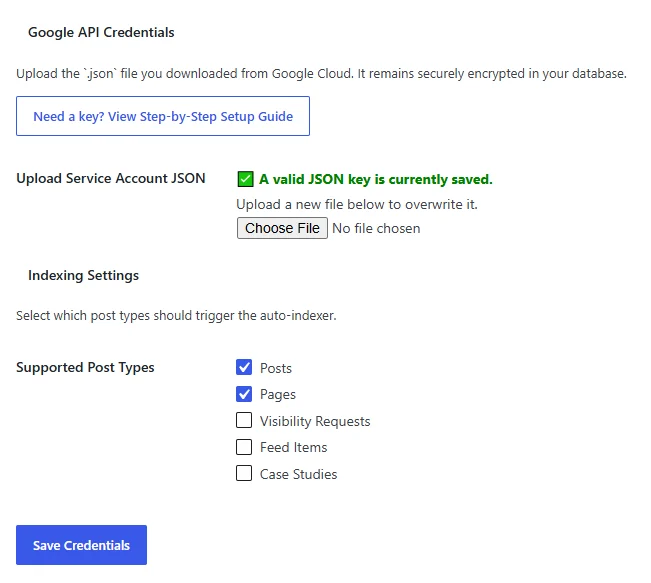
Install the XealBrax plugin, go to Settings > Auto Indexer, and upload your `.json` file. Set it and forget it.
Looking for more ways to optimize your website's performance?
Explore Our Full Suite of Free SEO Tools →Support XealBrax
Used a XealBrax tool?
If a XealBrax tool helped you save time, improve your website, optimize a listing, or support your online visibility, please share your experience on Trustpilot.
Your review helps other creators, businesses, and website owners decide whether XealBrax tools are useful.
Frequently Asked Questions
Why use this instead of an XML Sitemap?
XML Sitemaps are passive. They simply leave a list of URLs on your server hoping Google comes to read them eventually. The Indexing API is active. It pushes a notification directly to Google's servers demanding an immediate crawl. You should use both: your SEO plugin for sitemaps, and this plugin for instant indexing.
Why isn't my new post showing up in Google Search Console yet?
The Indexing API forces an instant crawl, not an instant Search Console reporting update. When our plugin pings Google, Googlebot crawls your URL within hours. However, the Google Search Console dashboard takes 3 to 7 days to batch and update its internal charts. To verify immediate success, do a live Google search. Go to google.com, use the search bar and search for site:yourdomain.com/your-post-url instead of checking GSC analytics.
Is this actually free?
Yes. The XealBrax Auto Indexer is a 100% free utility plugin. No premium gates, no limits. We built it as a free tool to support the community (and introduce you to our premium Auto Blogging Engine).
Will this work with WooCommerce?
Absolutely. The settings panel automatically detects all public custom post types on your site. You can tick a box to instantly push new WooCommerce Products, Portfolios, or Course pages.
Is my Google JSON key secure?
Yes. We use native PHP encoding to encrypt your JSON payload before it saves to the WordPress database. This prevents server text-formatting issues and keeps the key securely stored on your own server infrastructure.