WordPress powers over 40% of the web, but with great popularity comes fierce competition. In 2026, ranking on Google requires more than just publishing content—it demands a strategic, multi‑layered SEO approach that aligns with how search engines (and AI) evaluate websites today. This comprehensive guide walks you through everything you need to know about WordPress SEO in 2026, from foundational technical setup to advanced ranking strategies.
What’s Changed in SEO for 2026?
The SEO landscape has shifted dramatically. Google’s March 2026 Core Update reinforced that rankings are now determined by comparative value across competing pages, with greater weight placed on intent alignment, expertise, and overall content quality. Meanwhile, AI‑powered search experiences like Google AI Overviews are reshaping how users discover content, making it essential for WordPress sites to be technically sound, fast, and focused on delivering genuine value.
E‑E‑A‑T (Experience, Expertise, Authoritativeness, and Trustworthiness) has evolved from a nice‑to‑have to a ranking requirement, especially for sites in competitive niches. Simply put: Google wants to reward content created by real experts who demonstrate proven experience.
The Top 10 SEO Ranking Factors for WordPress in 2026
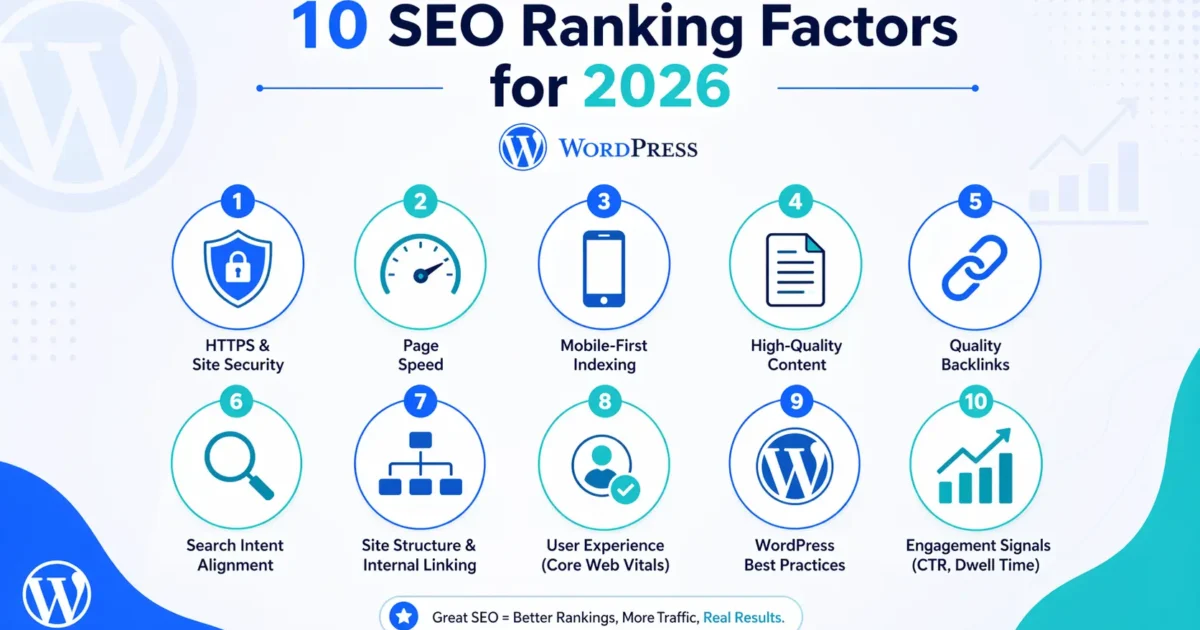
Before diving into tactical steps, let’s understand what Google actually cares about in 2026. Here are the top 10 ranking factors that influence where your WordPress site appears in search results:
| Rank | Factor | Why It Matters |
|---|---|---|
| 1 | Secure, Crawlable Website | If Google can’t access or understand your site, nothing else matters. HTTPS and proper robots.txt are essential. |
| 2 | Fast Page Speed (Especially Mobile) | Pages loading under 2.5 seconds consistently outrank slower competitors. Mobile speed is now the primary benchmark. |
| 3 | Mobile‑First Design | Google indexes the mobile version of your site first. Responsive, touch‑friendly design is non‑negotiable. |
| 4 | Strong Domain Authority & Clean URL Structure | Established sites with logical, keyword‑friendly URLs have a natural advantage. |
| 5 | Helpful, Optimized Content (E‑E‑A‑T Aligned) | Content must demonstrate real expertise, answer user intent, and provide unique value beyond what’s already available. |
| 6 | Solid Technical SEO Foundation | XML sitemaps, proper indexing, canonical tags, and structured data help search engines understand your content. |
| 7 | Positive User Experience Signals | Low bounce rates, strong engagement, and Core Web Vitals compliance signal that users find your site valuable. |
| 8 | High‑Quality Links (Internal, Backlinks, Outbound) | Strategic internal linking and authoritative backlinks remain powerful trust signals. |
| 9 | Brand Trust, Reputation & Social Proof | Consistent NAP (Name, Address, Phone) information, reviews, and brand mentions build credibility. |
| 10 | Verified Business Details (Schema, Reviews) | Structured data helps Google display rich results and understand your business context. |
🛠️ Free SEO Audit Tool: Want to see how your WordPress site performs against these ranking factors? Run our Free SEO Audit Tool and get actionable insights in minutes.
Step‑by‑Step WordPress SEO Optimization Checklist
Follow this proven checklist to systematically improve your WordPress SEO and climb the rankings.
Phase 1: Technical Foundation
- Choose Reliable, High‑Performance Hosting – Your hosting provider directly impacts speed, uptime, and Core Web Vitals. Managed WordPress hosting with NVMe storage and built‑in caching is ideal for SEO.
- Install an SSL Certificate – HTTPS is a confirmed ranking signal. Most quality hosts include free SSL; ensure it’s properly configured and enforced site‑wide.
- Select an SEO‑Friendly Theme – Lightweight, well‑coded themes (especially modern block themes) load faster and provide cleaner HTML structure. Avoid bloated, feature‑heavy themes you don’t need.
- Configure Permalinks Correctly – Go to Settings → Permalinks and select “Post name” (e.g.,
yoursite.com/sample-post/). This creates clean, keyword‑friendly URLs. - Create and Submit XML Sitemaps – Most SEO plugins auto‑generate sitemaps. Submit yours to Google Search Console and Bing Webmaster Tools for faster indexing.
Phase 2: On‑Page Optimization
- Conduct Keyword Research – Focus on long‑tail keywords and semantic variations that match user intent. Tools like Google Keyword Planner, Ahrefs, or Rank Math’s built‑in keyword analyzer help identify opportunities.
- Optimize Title Tags and Meta Descriptions – Every page and post needs a unique, compelling title (50–60 characters) and meta description (120–160 characters) that includes your primary keyword naturally.
- Structure Content with Proper Headings – Use one H1 per page, with H2s and H3s creating a logical hierarchy. Include relevant keywords in subheadings where natural.
- Implement Schema Markup (Structured Data) – Schema helps search engines understand your content context. Essential types for WordPress include Article, FAQ, Local Business, Product, and Review schema. Most SEO plugins offer one‑click implementation.
- Optimize Images for SEO – Compress images (WebP format preferred), use descriptive filenames, and always include alt text that describes the image content for accessibility and SEO.
Phase 3: Content Strategy & Authority Building
- Create Topic Clusters for Topical Authority – Build a pillar page covering a broad topic, then create supporting articles that link back to it. This signals to Google that your site is a comprehensive resource on that subject.
- Build Strategic Internal Links – Link related content together using descriptive anchor text. A strong internal linking structure distributes page authority and helps users (and crawlers) navigate your site.
- Earn High‑Quality Backlinks – Guest posting, industry partnerships, and creating genuinely link‑worthy content remain effective. Focus on relevance and authority over quantity.
- Keep Content Fresh and Updated – Regularly audit and refresh older content. Google favors up‑to‑date information, especially for topics where freshness matters (e.g., SEO trends, technology).
- Monitor Performance with Google Search Console & Analytics – Track impressions, clicks, average position, and Core Web Vitals. Use this data to identify opportunities and fix issues before they impact rankings.
Essential WordPress SEO Plugins Compared
Choosing the right SEO plugin can dramatically simplify optimization. Here’s how the leading options compare in 2026:
| Feature | Rank Math | Yoast SEO | All in One SEO |
|---|---|---|---|
| Free Schema Support | ✅ Multiple types | ✅ Basic schema | ✅ Basic schema |
| Keyword Optimization | ✅ Multiple keywords | ✅ One keyword (free) | ✅ One keyword (free) |
| Internal Linking Suggestions | ✅ Built‑in (free) | ✅ Premium only | ✅ Premium only |
| Redirection Manager | ✅ Included | ✅ Premium only | ✅ Included |
| AI Content Assistant | ✅ RankBot AI | ✅ Premium only | ✅ Premium only |
| Best For | Feature‑rich, budget‑friendly | Established, trusted ecosystem | Beginners, straightforward setup |
Recommendation: For most WordPress sites, Rank Math offers the most comprehensive free feature set, including multiple schema types and internal linking suggestions. Yoast remains a solid choice if you prefer its established ecosystem.
Common WordPress SEO Mistakes to Avoid
- Blocking Search Engines – Accidentally leaving “Discourage search engines” checked in Settings → Reading is surprisingly common. Always verify this setting.
- Ignoring Mobile Performance – With mobile‑first indexing, a site that performs poorly on phones will struggle to rank regardless of desktop scores.
- Keyword Stuffing – Over‑optimizing with repetitive keywords triggers spam filters. Write for humans first, then refine for SEO.
- Neglecting Page Speed – Every second of delay increases bounce rates and reduces conversions. Regular speed audits are essential.
- No Clear Content Strategy – Publishing random content without a cohesive topic strategy wastes crawl budget and confuses search engines about your site’s purpose.
Measuring Your SEO Success
Track these key metrics to gauge your WordPress SEO performance:
- Organic Impressions & Clicks – Monitor in Google Search Console; rising impressions indicate improved visibility.
- Average Position – Track keyword rankings over time, focusing on movement within the top 10 results.
- Core Web Vitals – Ensure LCP under 2.5s, INP under 200ms, and CLS under 0.1 for optimal page experience signals.
- Bounce Rate & Time on Page – High engagement signals quality content to Google.
- Index Coverage – Regularly check Search Console for indexing errors or warnings.
SEO is a long‑term investment, not a quick fix. By methodically implementing the strategies in this guide—starting with a solid technical foundation, layering on strategic on‑page optimization, and consistently building authority—your WordPress site will steadily climb the rankings and attract qualified organic traffic.
Ready to see where your site stands? Run our Free SEO Audit Tool for an instant health check and actionable recommendations tailored to your website.

A Personal Note From Collins E. Iyorah, Founder of XealBrax
I built XealBrax because creators, bloggers, and small businesses shouldn’t have to piece together fragmented tools to grow online. Whether you are optimizing your website performance, utilizing our AI-driven utilities, or scaling through our Creator Network, our goal is to give you a transparent, penalty-free path to digital success. If you want a complete look at how we help brands scale, read my personal guide to get started.