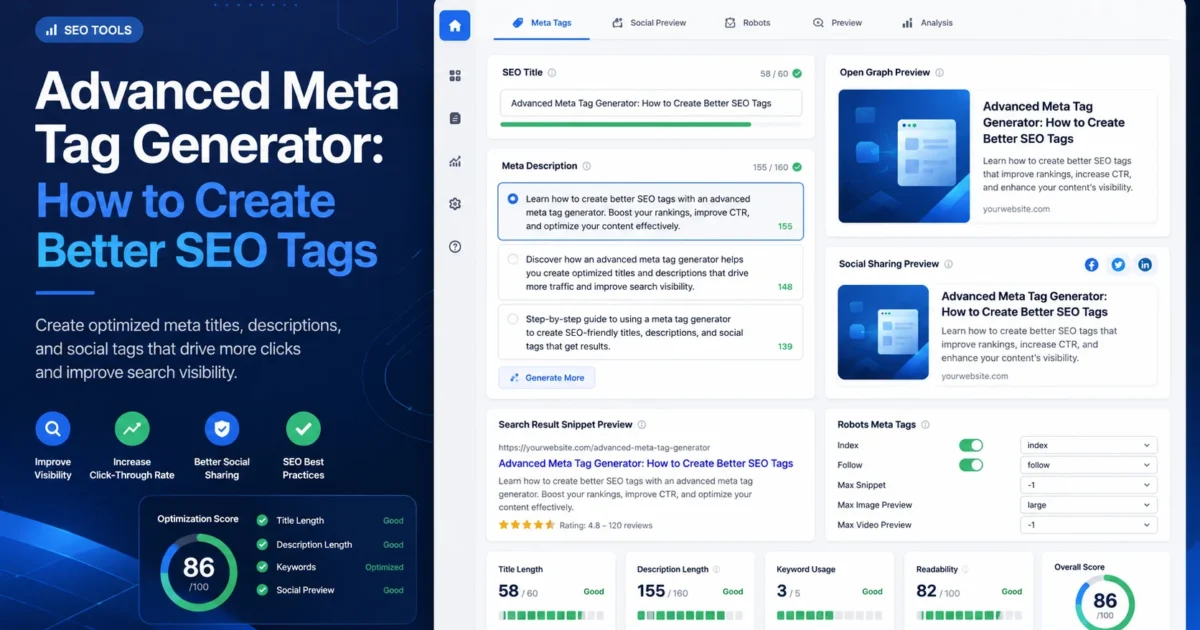
An advanced meta tag generator helps you create better SEO tags for search engines, social previews, and website pages. Instead of writing one random title and one generic description, you can generate clearer SEO titles, stronger meta descriptions, Open Graph tags, and social preview copy that match the purpose of the page.
This guide explains how advanced meta tags work, which tags matter most, what to review before publishing, and how to use the XealBrax Meta Tag Generator to create better metadata for blog posts, product pages, service pages, landing pages, and business websites.
Start here: Use the free XealBrax Meta Tag Generator to create SEO title ideas, meta descriptions, and social sharing metadata for your important website pages.
“`
“`
What Is an Advanced Meta Tag Generator?
An advanced meta tag generator is a tool that helps create and organize page-level metadata. Basic generators usually focus only on title tags and meta descriptions. Advanced generators can also support social sharing previews, Open Graph tags, Twitter/X card fields, robots meta settings, canonical tags, and page-specific metadata planning.
The goal is not to stuff keywords into every field. The goal is to make each page easier to understand, easier to share, and more useful when it appears in search results or social previews.
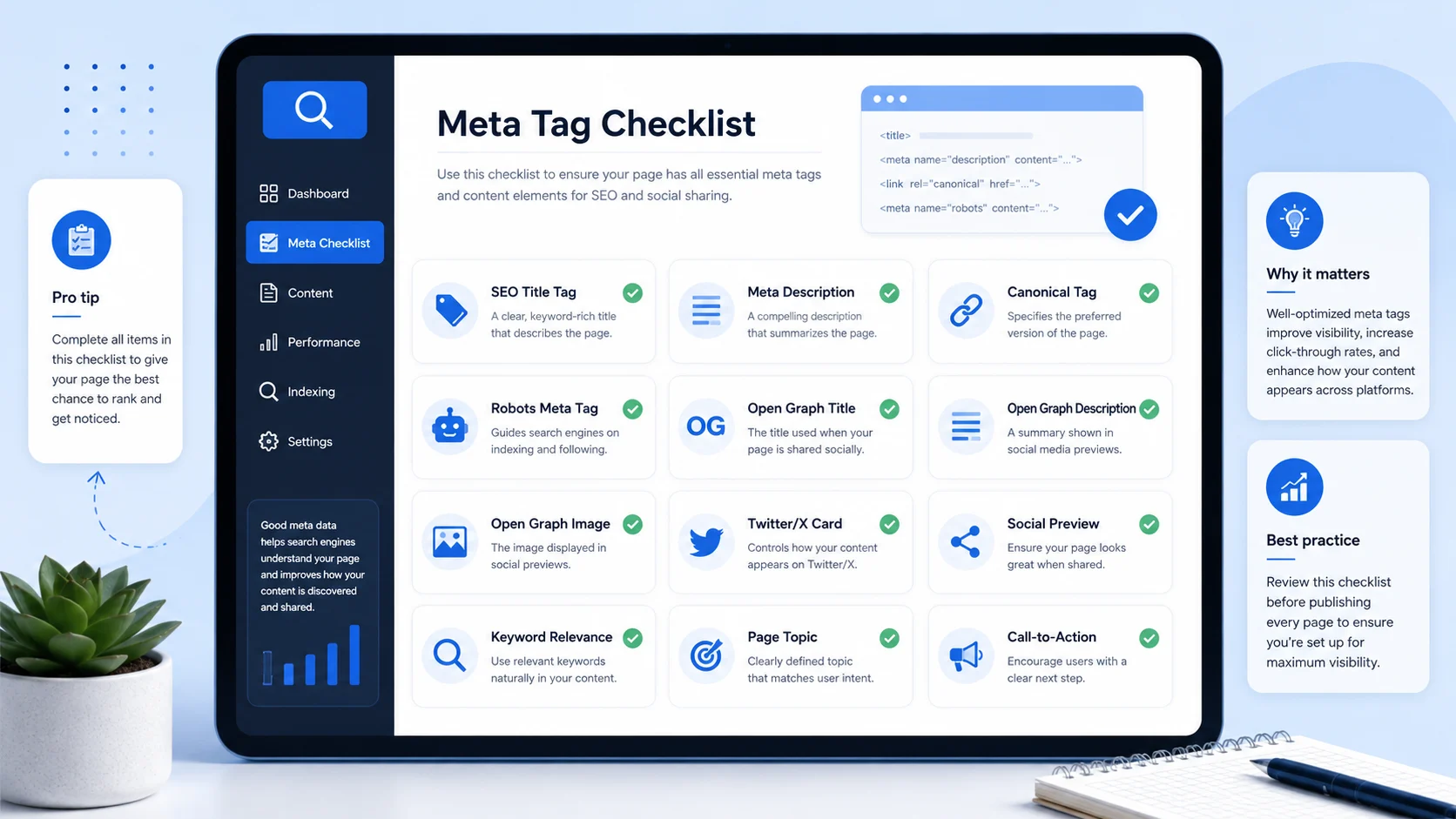
For most website owners, the most useful metadata fields are:
- SEO title tag: the page title search engines may use as the clickable headline.
- Meta description: the summary search engines may use below the title.
- Open Graph title: the title used when the page is shared on platforms that read Open Graph data.
- Open Graph description: the social sharing description for link previews.
- Open Graph image: the image preview used when the page is shared.
- Twitter/X card metadata: metadata that controls how a link can appear on X and other platforms that support card previews.
- Robots meta tag: page-level instructions such as index, noindex, follow, or nofollow.
- Canonical tag: the preferred URL for a page when duplicate or similar URLs exist.
Why Meta Tags Still Matter for SEO and Clicks
Meta tags are not magic ranking buttons. A title tag or meta description will not fix weak content, poor page speed, technical errors, or bad user experience by itself. However, metadata still matters because it helps describe the page and can influence how users understand your search result.
Google explains that title links in search results can be generated from several page signals, including the title element and visible page content. This means your title tag should be accurate, specific, and consistent with the page. You can review Google’s guidance on title links in search results.
Google also explains that snippets can be created from page content and the meta description when the description gives users a useful summary. You can review Google’s documentation on controlling snippets in search results.
The practical point is simple: if your metadata is missing, unclear, duplicated, or misleading, your page can look weaker in search and social previews even when the page itself is useful.
SEO Title Tags: The First Metadata Field to Fix
The SEO title tag is one of the most important metadata fields because it often influences the clickable headline shown in search results. A strong title should explain the page clearly and give the searcher a reason to click.
- The main topic or focus keyword.
- A clear benefit or page purpose.
- Readable wording that makes sense to humans.
- Enough detail to separate the page from similar pages.
- The brand name when useful.
Weak SEO title examples
- Home
- Services
- Products
- SEO, SEO Tool, SEO Tags, Meta Tags, SEO Generator
Better SEO title examples
- Website SEO Checker: 15 Issues That Stop Your Site From Ranking
- Advanced Meta Tag Generator: Create Better SEO Tags Fast
- Product Listing Optimizer: Improve Titles, Descriptions and Sales Copy
- WordPress Speed Optimization Services for Business Websites
Quick Tip
Your WordPress post title is usually the visible H1. Your Rank Math SEO title can be slightly more search-focused, but it should still match the content of the page.
Meta Descriptions: The Search Snippet Summary
A meta description is the short page summary that search engines may use below your title. It should explain what the page offers and why the result is useful.
A good meta description is not just a list of keywords. It should help users decide whether the page matches what they need.
A strong meta description should:
- Summarize the page clearly.
- Use the main topic naturally.
- Explain the value of the page.
- Match the actual content.
- Avoid exaggerated promises.
- Avoid copying the same description across many pages.
Weak meta description
SEO tags, meta tags, title generator, description generator, best SEO, ranking tool.
Better meta description
Use this advanced meta tag generator guide to create better SEO titles, meta descriptions, Open Graph tags, and social previews for important website pages.
Useful tool: If your page has missing or weak descriptions, use the XealBrax Meta Tag Generator to create better options before publishing.
Open Graph Tags: Better Social Sharing Previews
Open Graph tags help control how your page appears when shared on platforms and apps that read social preview metadata. These tags can affect the title, description, image, and URL shown in a shared link preview.
This matters because people do not only discover pages through Google. They also see links on social platforms, messaging apps, communities, newsletters, and private groups.
Important Open Graph fields
- og:title: the social sharing title.
- og:description: the social preview summary.
- og:image: the preview image.
- og:url: the canonical URL used in the preview.
- og:type: the content type, such as website or article.
Twitter/X Card Tags and Social Metadata
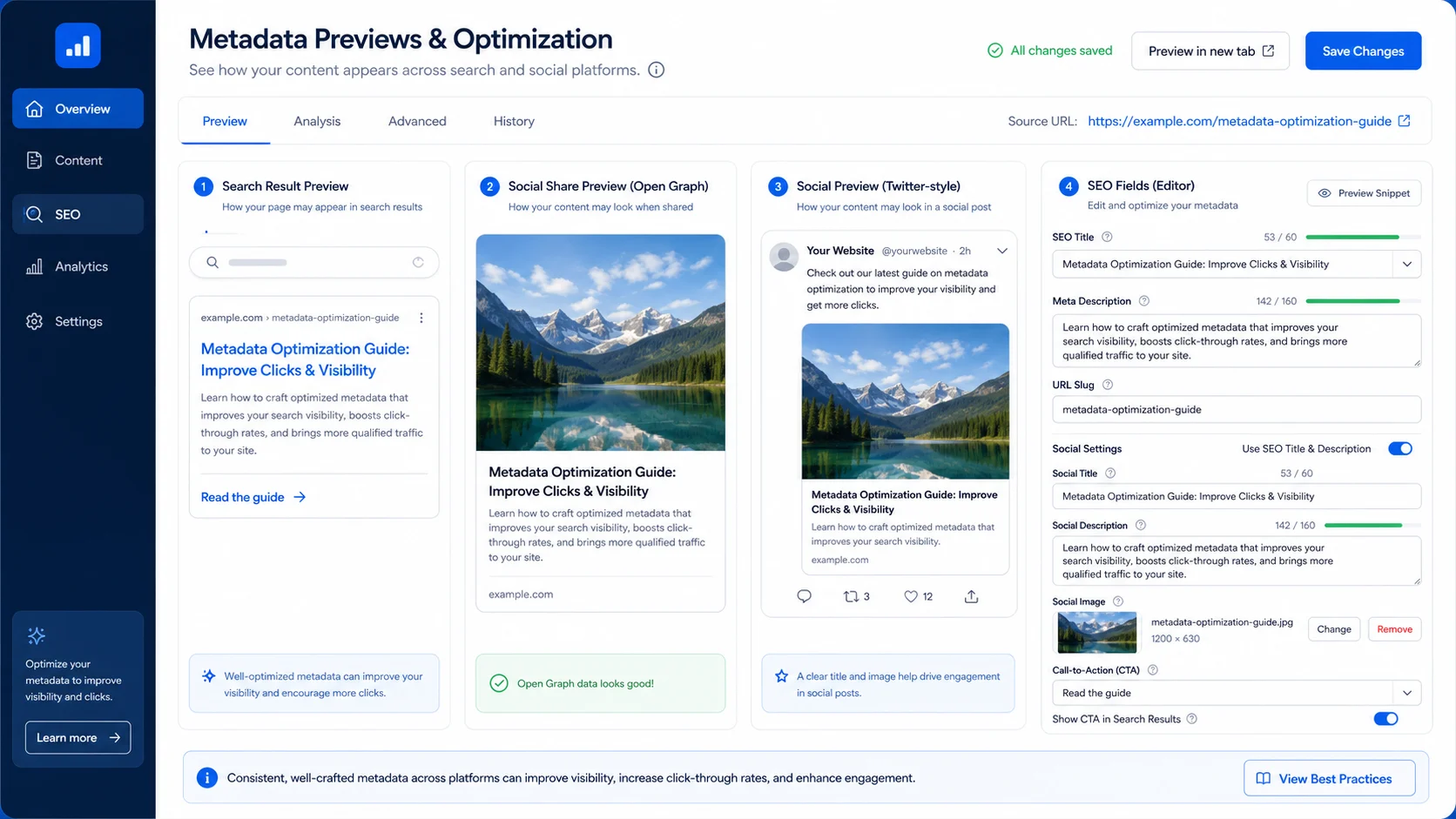
Twitter/X card metadata helps shape how your page may appear when shared on X and other platforms that support similar preview structures. Even if a platform does not use every tag exactly the same way, preparing social metadata helps your link look more complete when shared.
For most website owners, the key fields are the title, description, image, and card type. These should be consistent with your page and your Open Graph metadata.
What to check before publishing
- Does the social title explain the page clearly?
- Does the social description summarize the value?
- Is the image relevant and properly sized?
- Does the image have useful alt text in WordPress?
- Does the preview match the page content?
Robots Meta Tags and Snippet Controls
Robots meta tags give page-level instructions to search engines. They can tell crawlers whether a page should be indexed, whether links should be followed, and how much of a snippet can be shown in search.
These settings should be handled carefully. Accidentally setting an important page to noindex can stop it from appearing in search results.
Google documents supported special tags and robots meta controls in its guide to Google-supported meta tags.
Common robots meta values
- index: allows the page to be indexed.
- noindex: tells search engines not to index the page.
- follow: allows crawlers to follow links on the page.
- nofollow: tells crawlers not to follow links on the page.
- max-snippet: controls snippet length in supported cases.
- max-image-preview: controls image preview size in supported cases.
Important Note
Do not set important blog posts, service pages, product pages, or tool pages to noindex unless you clearly understand why that page should be excluded from search results.
Canonical Tags and Preferred URLs
A canonical tag tells search engines which URL should be treated as the preferred version of a page. This is useful when the same or similar content can be accessed through multiple URLs.
For example, a product, blog post, or landing page may have tracking parameters, category paths, or duplicate versions. The canonical tag helps point search engines to the main version.
Canonical mistakes to avoid
- Pointing the canonical tag to the homepage by mistake.
- Pointing to a URL that redirects.
- Using the wrong domain version.
- Using the wrong protocol, such as HTTP instead of HTTPS.
- Setting canonicals inconsistently across similar pages.
If you use WordPress and Rank Math, check the canonical field when working on important SEO pages, duplicate templates, landing pages, or product pages.
How to Use the XealBrax Meta Tag Generator
The XealBrax Meta Tag Generator helps you create metadata faster without starting from a blank page. It is useful for website owners, bloggers, e-commerce sellers, creators, freelancers, agencies, and small businesses.
- Choose the page type: blog post, product page, service page, homepage, landing page, or tool page.
- Enter the page topic: describe what the page is about in plain language.
- Add the focus keyword: use the main phrase you want the page to target.
- Generate options: create multiple SEO title and meta description ideas.
- Review the output: choose the version that best matches search intent and page content.
- Add metadata in Rank Math: paste the title and description into the correct Rank Math fields.
- Set social previews: add Open Graph and Twitter/X title, description, and image where needed.
If you are unsure whether your page already has metadata problems, run a quick check with the XealBrax SEO Audit Tool before updating the page.
Create Better SEO Tags With XealBrax
Generate SEO title ideas, meta description options, and social preview metadata for your important pages, posts, products, and services.
Meta Tag Examples by Page Type
Different pages need different metadata. A blog post, product page, service page, and tool page should not all use the same style of title and description.
Blog post example
SEO title: Website SEO Checker: 15 Issues That Stop Your Site From Ranking
Meta description: Use this website SEO checker guide to find common issues that stop pages from ranking, including titles, descriptions, speed, indexing, links, images, and schema.
Service page example
SEO title: WordPress Speed Optimization Services for Business Websites
Meta description: Improve your WordPress website speed, Core Web Vitals, image optimization, caching setup, and technical performance with practical XealBrax support.
Product page example
SEO title: Lightweight Running Shoes for Daily Training and Comfort
Meta description: Discover lightweight running shoes designed for daily training, breathable comfort, reliable grip, and everyday road running support.
Tool page example
SEO title: Advanced Meta Tag Generator: Free SEO Tags for Search and Social Sharing
Meta description: Generate SEO titles, meta descriptions, Open Graph tags, and social sharing metadata for website pages, blogs, products, and service pages.
If you sell products online, you can also use the XealBrax Product Listing Optimizer to improve product titles, descriptions, benefits, and sales copy before finalizing your metadata.
Common Meta Tag Mistakes to Avoid
A generator can speed up your workflow, but metadata still needs human review. Before publishing, check for these common mistakes.
1. Using the same title on every page
Duplicate titles make it harder for users and search engines to understand which page is most relevant. Every important page should have a unique title.
2. Writing vague descriptions
A meta description like “Welcome to our website” does not explain the value of the page. Be specific.
3. Keyword stuffing
Repeating keywords unnaturally makes metadata look spammy. Use keywords naturally and write for real users.
If you do not set Open Graph and social preview metadata, your link may look weak when shared on social platforms or messaging apps.
5. Setting the wrong robots meta tag
Accidentally using noindex on an important page can prevent it from appearing in search results.
6. Forgetting to match metadata with the page
Metadata should accurately describe the content. Misleading titles and descriptions can reduce trust and increase bounce rates.
Recommended Advanced Meta Tag Workflow
Use this workflow whenever you publish or update an important page:
- Audit the page: check existing metadata, speed, headings, links, and technical SEO signals with the SEO Audit Tool.
- Define the search intent: decide what the searcher wants from the page.
- Generate metadata: use the XealBrax Meta Tag Generator to create title and description options.
- Review manually: check accuracy, clarity, length, keyword use, and page alignment.
- Add social metadata: set Open Graph and Twitter/X titles, descriptions, and images in Rank Math.
- Check robots and canonical settings: make sure important pages are indexable and canonical tags point to the correct URL.
- Publish and monitor: review impressions, clicks, and CTR in Google Search Console over time.
Need help fixing metadata across your site? XealBrax can help review SEO titles, meta descriptions, social previews, technical SEO issues, and WordPress performance.
Using Rank Math With Generated Meta Tags
Since many WordPress website owners use Rank Math, the generated metadata should be reviewed and added carefully inside the Rank Math fields.
Recommended Rank Math checks
- Add the SEO title in the Rank Math title field.
- Add the meta description in the Rank Math description field.
- Set the focus keyword for tracking and optimization guidance.
- Set Open Graph image, title, and description for social sharing.
- Set Twitter/X card details if needed.
- Review canonical URL settings for important pages.
- Check the robots meta setting before publishing.
Rank Math scores are useful as guidance, but do not write metadata only to satisfy a plugin score. The final metadata should still sound natural and match the page.
Helpful Meta Tag and SEO Resources
For deeper guidance, review trusted search documentation alongside the XealBrax tools. Google’s title link documentation explains how title links may be generated in search results. Google’s snippet documentation explains how snippets can be created from page content and meta descriptions. Google’s supported meta tags documentation explains robots meta tags and other page-level controls.
Use these resources with the XealBrax Meta Tag Generator, the free SEO Audit Tool, and the XealBrax free tools page to build a cleaner metadata workflow.
FAQ: Advanced Meta Tag Generator
What is an advanced meta tag generator?
An advanced meta tag generator is a tool that helps create SEO titles, meta descriptions, Open Graph tags, social preview metadata, and other page-level metadata for website pages, blog posts, products, services, and landing pages.
“`
The most important metadata fields for most website owners are the SEO title tag, meta description, robots meta tag, canonical tag, and social preview tags such as Open Graph title, description, and image.
Can AI write meta descriptions for me?
Yes. AI can help generate meta description ideas faster, but you should review the output manually to make sure it is accurate, readable, unique, and aligned with the page content.
Do meta descriptions directly affect rankings?
Meta descriptions are not direct ranking factors in the same way as content quality, crawlability, and page relevance, but they can influence how useful your search snippet looks and may affect click-through behavior.
Open Graph tags are metadata fields that help control how a page appears when shared on platforms and apps that use social preview data. They can define the title, description, image, URL, and content type shown in a link preview.
Yes. Important pages should have unique SEO titles and meta descriptions. Duplicate metadata can make pages harder to distinguish in search results and can weaken the clarity of your site structure.
“`
Generate Better SEO Tags for Your Next Page
Start with a clear page topic, generate better metadata, review the output, and publish stronger SEO titles, meta descriptions, and social previews with XealBrax.

A Personal Note From Collins E. Iyorah, Founder of XealBrax
I built XealBrax because creators, bloggers, and small businesses shouldn’t have to piece together fragmented tools to grow online. Whether you are optimizing your website performance, utilizing our AI-driven utilities, or scaling through our Creator Network, our goal is to give you a transparent, penalty-free path to digital success. If you want a complete look at how we help brands scale, read my personal guide to get started.