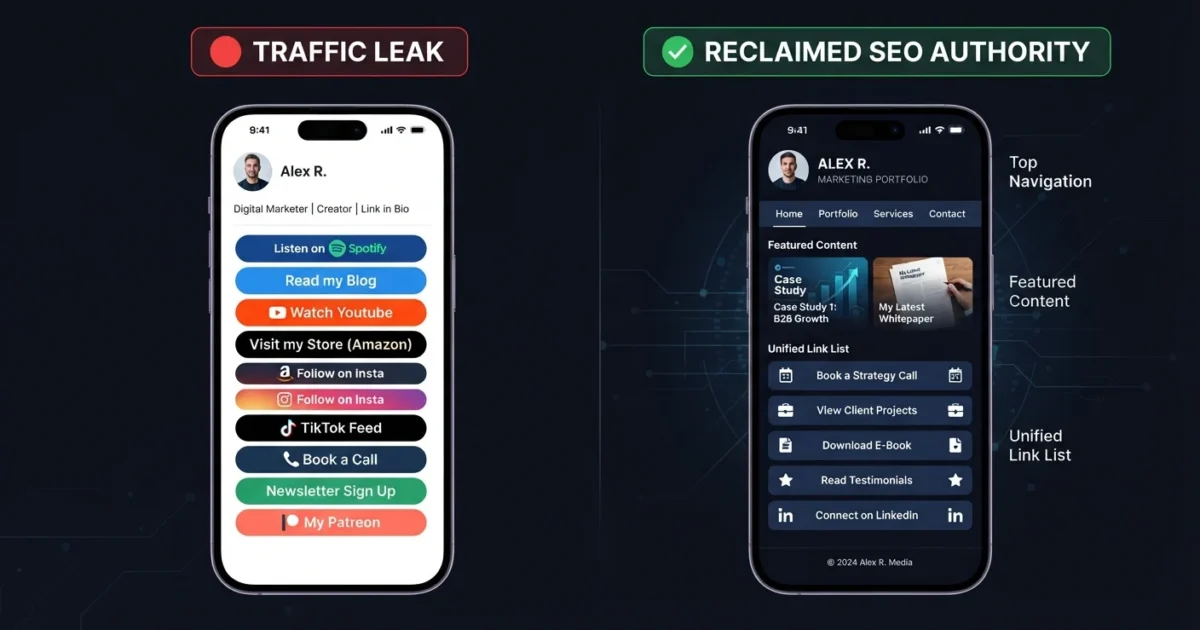
A custom link in bio page is a self-hosted, distraction-free landing page created directly on your own website domain to house your important social media connection links. While generic third-party bio tools are convenient for creators without websites, business owners and professional brands with existing domains are missing a massive opportunity by using them. Sending high-intent social traffic to third-party domains leaks valuable search signals, hurts conversion rates, and prevents free tracking pixel retargeting. If you want to optimize your social media traffic, creating a custom link in bio is the most effective approach.
This guide explains the strategic advantages of switching to a self-hosted links directory, how a custom link in bio page improves conversions, and a simple walkthrough on how to build a responsive, custom-branded link hub on WordPress without bloated plugins or slow loading times.
Get Started: Explore how Collins binned his Linktree and created an optimized, custom-branded link in bio page directly on XealBrax to maximize brand reach and security.
The Hidden Cost of Generic Link-in-Bio Tools
Link-in-bio tools have become a social media tradition. Almost every Instagram, TikTok, Facebook, and YouTube profile features a bio link. While this is acceptable for hobbyists, established businesses are operating a leaky bucket when they do not use a custom link in bio page.
Every time a user clicks your social bio link, they represent a highly engaged, high-intent prospect. Directing them to a third-party domain means you are actively donating those traffic signals, user session durations, and backlink authority to another company. By hosting your own custom link in bio page, you can easily retain these visitors on your own domain.
Google’s SEO Starter Guide highlights the importance of helping search engines find, crawl, and understand your content. Hosting your links on your own domain through a custom link in bio page continuously feeds your website’s organic indexing, builds domain authority, and ensures your main brand is always the primary search result.
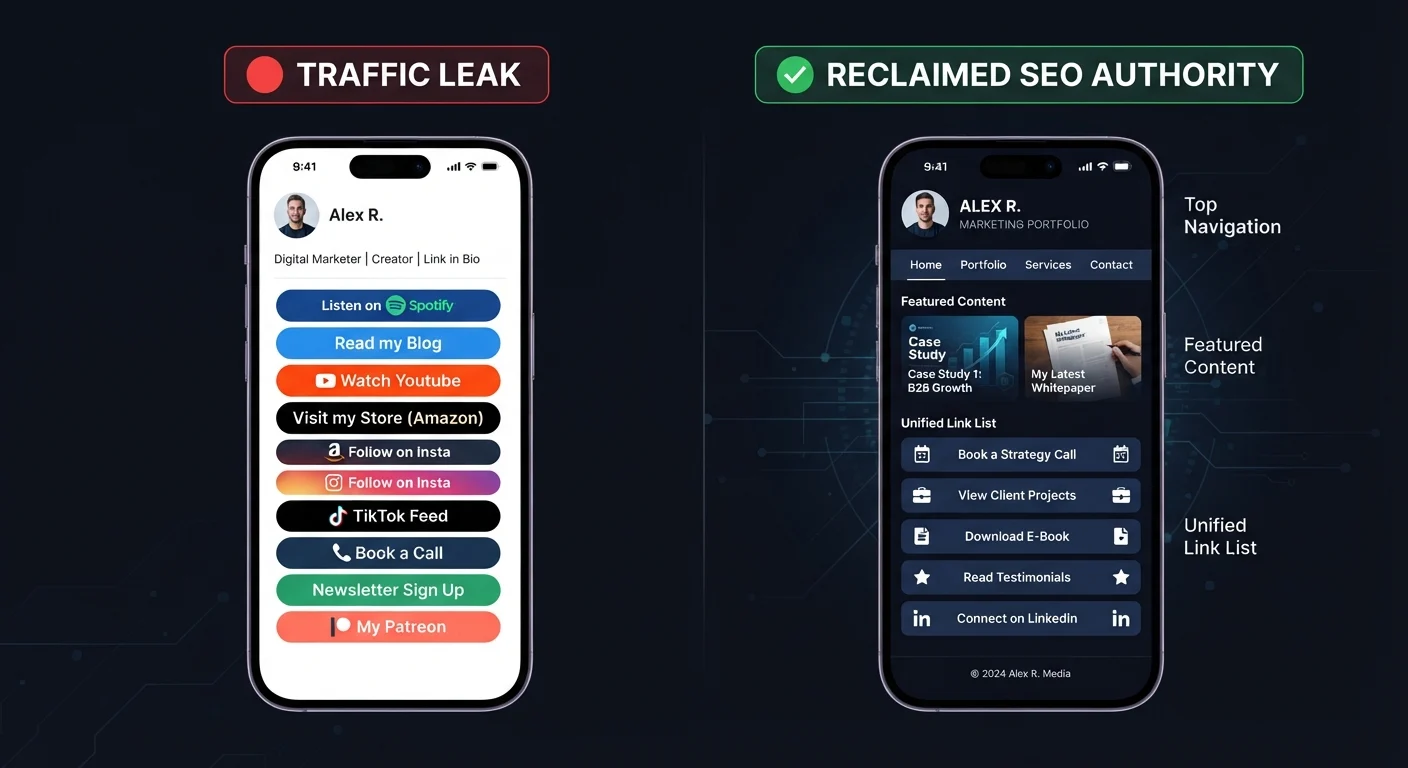
5 Reasons Why Your Business Needs a Custom Link in Bio
Switching to a self-hosted links directory offers several technical and strategic advantages. Below are the five primary reasons why your business needs a custom link in bio page.
1. Complete Pixel Retargeting (Free Audience Building)
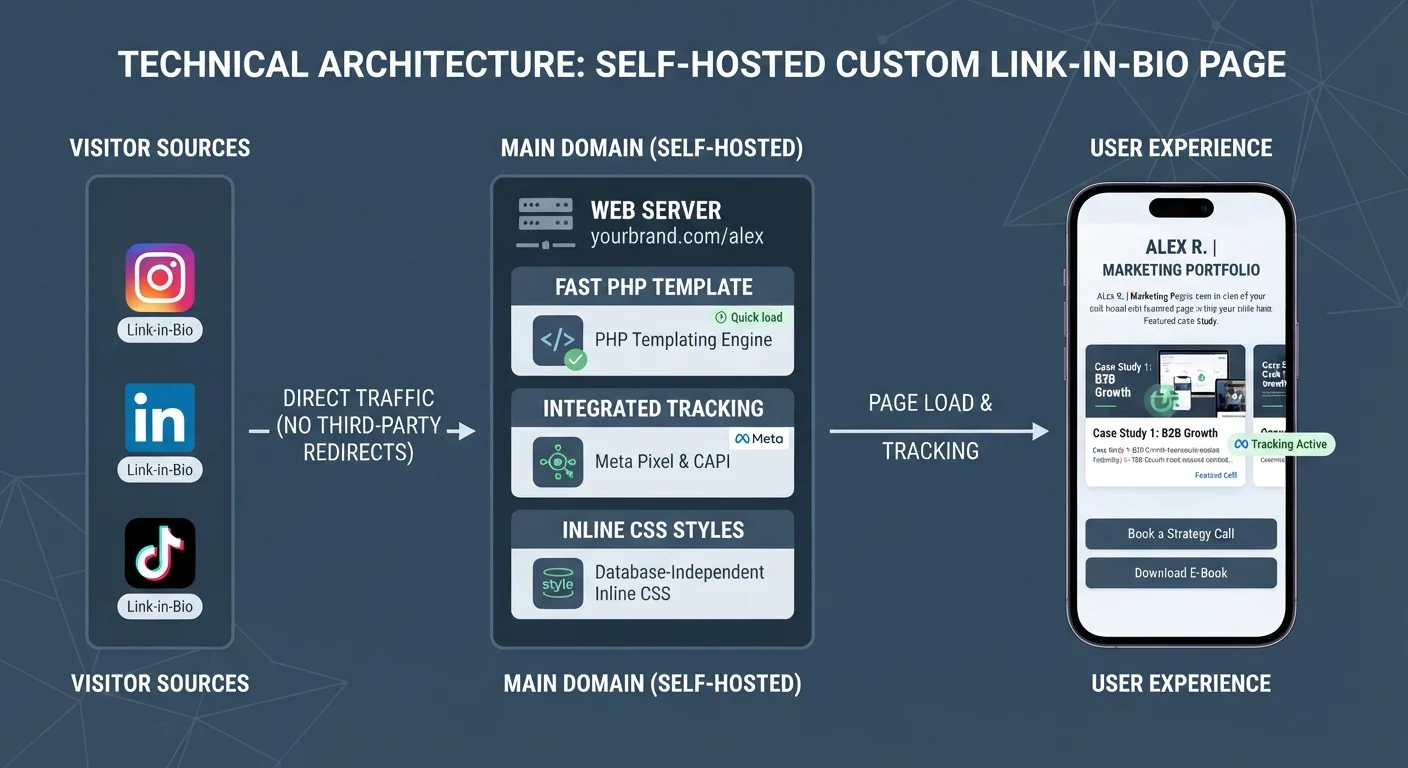
Most third-party bio tools charge expensive monthly premium subscriptions just to let you add your Facebook, TikTok, or Google tag tracking pixels to your custom link in bio setup. By hosting your page yourself, you can embed your standard tracking tags directly. This lets you build highly valuable, warm retargeting audiences of users who clicked from your social bios all for free.
2. Instant Mobile Load Speeds
Standard templates are often bogged down with external analytics trackers and heavy scripts, causing significant latency inside social media app webviews. A custom link in bio page built with a lightweight single-file PHP structure, system-native fonts, and inline CSS can load in under 0.2 seconds, completely eliminating visitor drop-off.
3. Unrestricted Brand Customization
Standard directories limit your design to vertical rows of generic buttons. Self-hosting your custom link in bio page allows you to showcase your diverse portfolio under a unified brand. You can easily present e-commerce stores, B2B agency services, sitemap tools, and author profiles side-by-side on a beautiful grid.
4. Dynamic Conversion Rate Optimization
Instead of forcing users to click an external link, copy an email address, or open a messaging app, you can embed secure, native conversion tools directly on your custom link in bio. Users can fill out a spam-shielded contact form, book a consultation, or test out a free business utility without leaving the viewport.
5. No Licensing or Subscription Fees
If you already pay for web hosting, there is no reason to pay an additional monthly fee to a third-party company just to display a list of links. Self-hosting a custom link in bio page is completely free, database-independent, and permanently yours.
Step-by-Step Guide to Creating Your Custom Link Hub on WordPress
Creating your own self-hosted custom link in bio page in WordPress is simple and can be done without relying on slow page builders. Follow this step-by-step workflow to build your own custom link in bio:
- Create the PHP File in Your Theme: Connect to your server via FTP or hosting File Manager. Inside your active theme directory, create a new file and name it
page-getting-started-with-collins.php. - Declare the Page Template Header: At the very top of the file, add a PHP comment block declaring the template name. This lets WordPress recognize it as a selectable template in your admin dashboard.
- Write the Secure Form Processor: Add a secure POST handler at the top of the file. Use a WordPress nonce to protect against CSRF attacks and integrate an invisible honeypot text field to quietly reject automated spam bots.
- Design the HTML Shell and Inline CSS: Write the HTML layout using system fonts and inline styles. Using system fonts means the page doesn’t have to load external Google Fonts, resulting in extremely fast mobile load times.
- Call Core WordPress Hooks: Ensure you include
wp_head()inside the head tag,wp_body_open()after opening the body tag, andwp_footer()before closing the body tag. This allows your SEO plugins (like Rank Math) to inject sitemap, canonical, and optimization metadata natively. - Create and Publish the Page: In your WordPress dashboard, create a new page, name it, set the slug exactly to
getting-started-with-collins, select your custom template, and click Publish.
How Rank Math Helps Optimize Your Link Hub
By calling the standard wp_head() hook in your custom template, your Rank Math SEO plugin can actively optimize your custom link in bio page just like any other post.
Verify these Rank Math settings:
- Customize the SEO Title: Set a search-friendly title so search engines index your brand correctly.
- Write an Engaging Meta Description: Enter a compelling description that describes your skills, active ventures, and business tools.
- Confirm Robots Index Settings: In the Rank Math advanced tab, verify that the page is set to Index and Follow. This ensures Google can crawl and list your custom link in bio hub on search result pages.
Build Your Own Branded Link Hub
Own your traffic, build search authority, and integrate direct, spam-shielded contact forms on your own website domain by creating a custom link in bio.
Helpful Resources for Personal Branding and Conversions
For deeper technical guidance, review the official documentation on indexability and metadata. Google’s SEO Starter Guide explains common site improvements that help search crawlers discover and index important pages. The official Schema.org specifications for a Person explain how to format structured data so search engines can map your digital footprint and social profiles accurately.
Use these guidelines alongside the XealBrax Personal Getting Started Hub and our free SEO utility stack to build a cleaner, faster digital presence using a custom link in bio page.
FAQ: Custom Link in Bio Pages
Why should I switch from Linktree to a custom link in bio page?
Self-hosting your links hub keeps 100% of your warm social media traffic on your own domain, which builds search engine authority, allows you to track audiences with pixels for free, and offers complete brand customization. Placing a custom link in bio on your own site is the most secure growth strategy.
Will a custom links page slow down my website?
No. If coded cleanly as a lightweight, single-file PHP page with system-native fonts and inline CSS, it will bypass database queries and load on mobile devices in under 0.2 seconds [cite: page-user-dashboard.php].
How does Rank Math SEO help my custom links page?
By calling the standard wp_head() hook in your custom template [cite: page-getting-started-with-collins.php], Rank Math can dynamically manage your sitemap, canonical, indexability settings, and Open Graph tags natively [cite: page-getting-started-with-collins.php].
How can I protect my custom links contact form from spam?
Implementing a silent “honeypot” field is highly effective [cite: page-join.php]. It is an invisible input field that automated spam bots are forced to fill out but human users cannot see, letting you block spam submissions immediately [cite: page-join.php].
Can I still track visitor analytics on a custom, self-hosted links page?
Yes. In fact, hosting your own links page gives you far better analytics tracking than third-party tools. Because the page runs directly on your WordPress site, you can natively integrate Google Analytics, set up custom event tracking, and embed Meta or TikTok tracking pixels to monitor exactly how your social media traffic interacts with your site.

A Personal Note From Collins E. Iyorah, Founder of XealBrax
I built XealBrax because creators, bloggers, and small businesses shouldn’t have to piece together fragmented tools to grow online. Whether you are optimizing your website performance, utilizing our AI-driven utilities, or scaling through our Creator Network, our goal is to give you a transparent, penalty-free path to digital success. If you want a complete look at how we help brands scale, read my personal guide to get started.