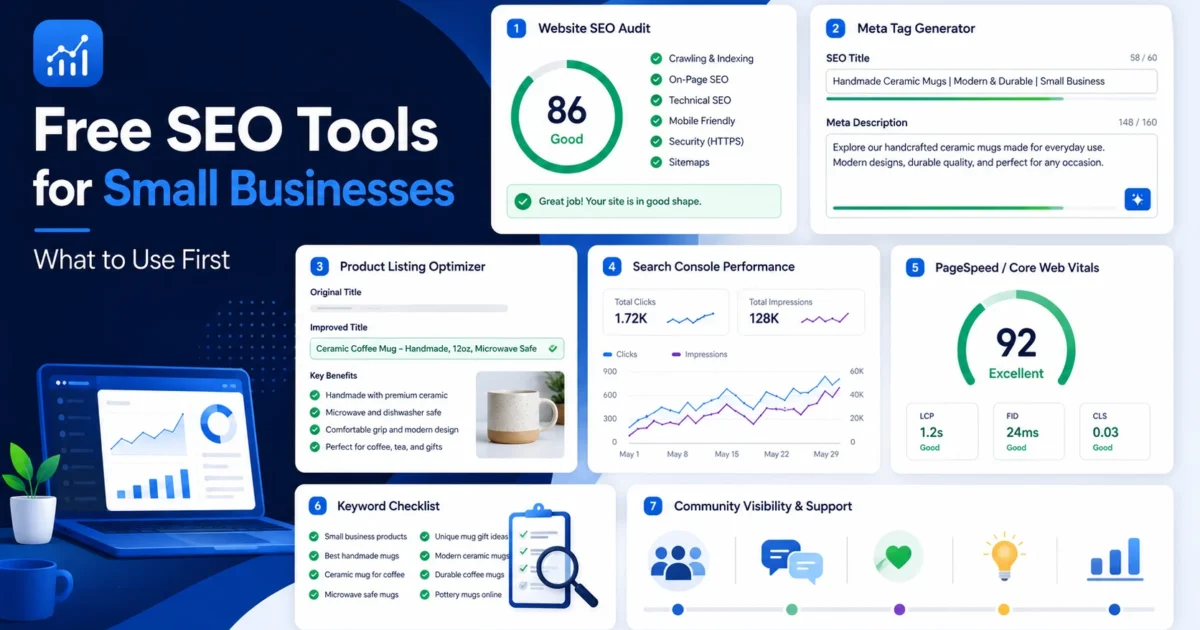
Free SEO tools for small businesses can help you understand what is happening on your website before you spend money on ads, redesigns, or full SEO support. The right tools can show you missing titles, weak meta descriptions, slow pages, indexing problems, product listing issues, and search performance gaps.
This guide explains what free SEO tools small businesses should use first, what each tool helps with, and when it makes sense to move from free checks to expert help. It is written for service businesses, creators, online sellers, WordPress site owners, Shopify sellers, WooCommerce stores, and Nigerian small businesses trying to improve online visibility carefully.
Start here: Explore free XealBrax tools for website SEO audits, meta tags, product listing optimization, and practical visibility support.
Why Small Businesses Should Start With Free SEO Tools
Small businesses often need clarity before they need a large SEO campaign. Free SEO tools give you a starting point. They help you see what is missing, what is broken, and what may need improvement.
A business owner may not know whether the problem is speed, content, indexing, metadata, product page structure, or weak internal linking. A basic tool stack can help separate assumptions from real issues.
Google’s SEO Starter Guide explains that search optimization includes helping search engines crawl, index, and understand content. Free tools help small businesses review those fundamentals before investing more heavily in SEO work.
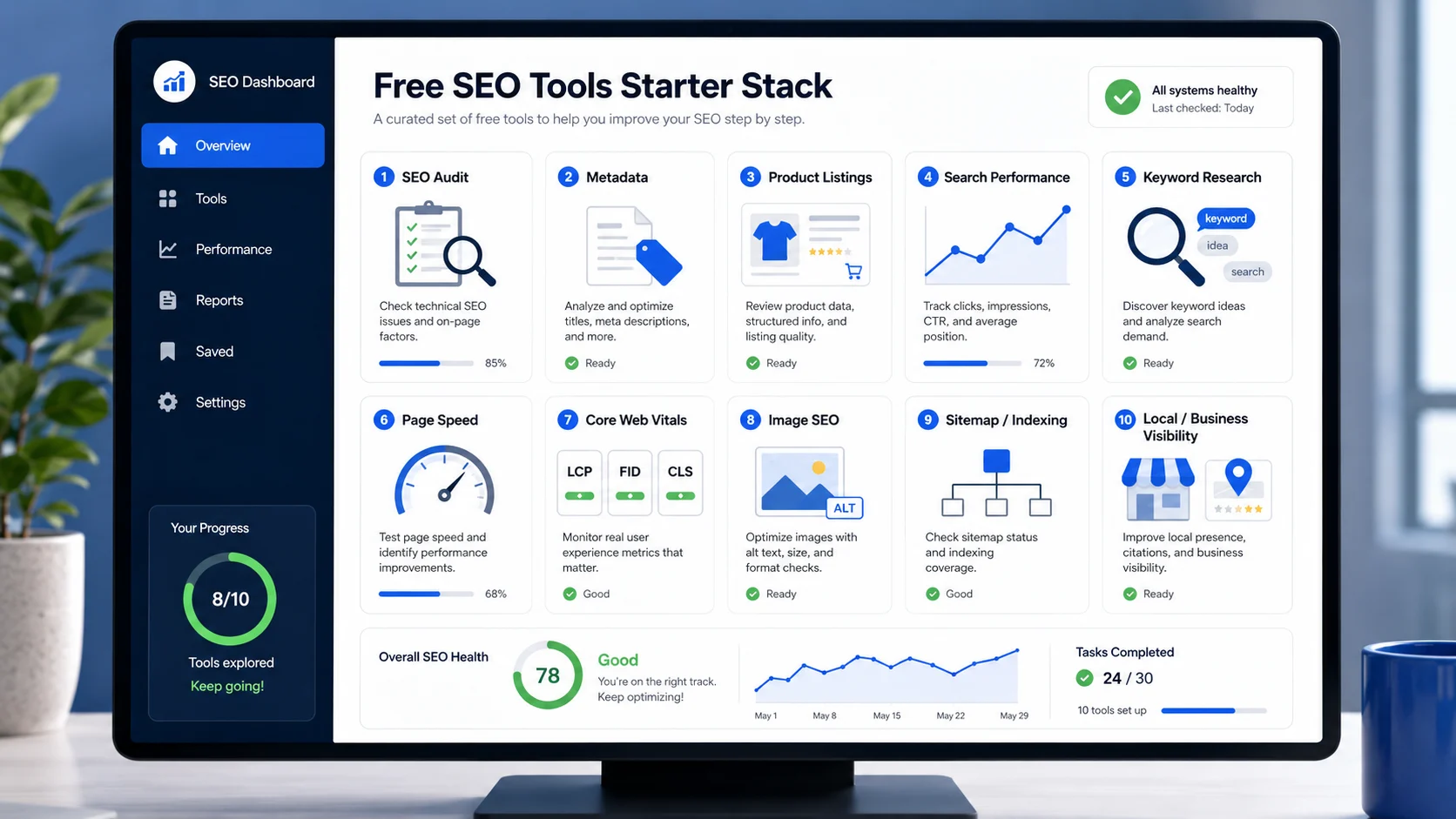
What Free SEO Tools Can and Cannot Do
Free SEO tools are useful, but they are not magic. They can identify problems and give you direction, but they do not automatically fix your website, write your strategy, or guarantee rankings.
Free SEO tools can help you:
- Find missing or weak page titles.
- Check meta descriptions.
- Review headings and page structure.
- Spot speed and Core Web Vitals issues.
- Check indexing and sitemap basics.
- Improve product titles and descriptions.
- Monitor clicks, impressions, and search queries.
- Find simple technical SEO issues.
Free SEO tools cannot fully replace:
- Human judgment.
- Technical implementation.
- Content strategy.
- Competitor analysis.
- Conversion optimization.
- Website redesign decisions.
- Long-term SEO planning.
Practical Rule
Use free SEO tools to identify and understand issues. Use expert support when the fixes require technical work, strategy, content planning, or careful implementation.
Free SEO Tools for Small Businesses: 10 Essential Tools to Use First
Below are the main free SEO tools and tool categories small businesses should use first. The best order depends on your website, but this sequence gives most business owners a clean starting point.
1. Website SEO Audit Tool
A website SEO audit tool helps you check the basic health of a page or website. It can review title tags, meta descriptions, headings, internal links, image ALT text, speed signals, canonical tags, sitemap signals, schema, and other technical SEO issues.
This is usually the best first tool because it gives you a broad overview. Instead of guessing what is wrong, you can see which issues need attention.
Use a website SEO audit tool to check:
- Title tags and meta descriptions.
- H1 and H2 heading structure.
- Internal and external links.
- Image ALT text.
- Page speed and performance signals.
- Robots.txt and sitemap signals.
- Canonical tags and schema markup.
Useful tool: Start with the XealBrax free SEO Audit Tool to check common website SEO and visibility issues.
2. Google Search Console
Google Search Console is one of the most important free SEO tools for small businesses. It helps you understand how your website appears in Google Search.
It can show search queries, impressions, clicks, average position, indexing issues, sitemap status, and page experience signals. Google’s Search Console documentation explains how Performance reports use metrics such as impressions, clicks, CTR, and position.
Use Google Search Console to check:
- Which queries show your pages in search.
- Which pages get impressions but low clicks.
- Whether important pages are indexed.
- Whether Google has crawl or indexing warnings.
- Which pages may need better titles and descriptions.
- Whether your sitemap was discovered.
If a page gets impressions but no clicks, review the SEO title and meta description. The XealBrax Meta Tag Generator can help create better snippet ideas.
3. PageSpeed Insights
PageSpeed Insights helps you check loading speed, performance, and Core Web Vitals signals. This is useful because slow pages can hurt user experience and reduce conversions.
Google’s PageSpeed Insights documentation explains that Core Web Vitals are common performance signals, including LCP, INP, and CLS. These metrics help website owners understand loading performance, responsiveness, and visual stability.
Use PageSpeed Insights to check:
- Mobile performance.
- Desktop performance.
- Largest Contentful Paint.
- Interaction to Next Paint.
- Cumulative Layout Shift.
- Image and script problems.
- Render-blocking resources.
For WordPress websites, speed problems may come from heavy themes, large images, plugins, poor caching, fonts, or server limitations. If your results show persistent speed problems, review XealBrax Services for hands-on support.
4. Meta Tag Generator
A meta tag generator helps small businesses create better SEO titles and meta descriptions for important pages. This matters because titles and descriptions can affect how useful your search result looks.
If your page title is vague or your meta description is missing, users may skip your result even when the page appears in search.
Use a meta tag generator for:
- Blog post SEO titles.
- Service page meta descriptions.
- Product page snippets.
- Landing page metadata.
- Open Graph and social preview copy.
- Rank Math title and description fields.
Useful tool: Use the XealBrax Meta Tag Generator to create SEO title and meta description ideas for pages, posts, products, and services.
5. Product Listing Optimizer
If your business sells products online, a product listing optimizer can help improve product titles, descriptions, bullet points, benefits, keywords, and product page clarity.
This is useful for Shopify stores, WooCommerce stores, marketplace sellers, Instagram sellers, WhatsApp sellers, and small e-commerce businesses.
Use a product listing optimizer to improve:
- Product titles.
- Product descriptions.
- Bullet points.
- Buyer benefits.
- Product details such as size, color, material, and use case.
- Image ALT text ideas.
- Marketplace and store listing clarity.
You can use the XealBrax Product Listing Optimizer to create stronger listing copy before publishing or updating products.
6. Keyword Research Tools
Keyword research tools help you understand what people search for. Small businesses do not need to chase every keyword. The better approach is to choose realistic topics that match your services, products, location, and buyer intent.
Use keyword research tools to find:
- Service keywords.
- Product keywords.
- Question-based keywords.
- Local search terms.
- Low-competition topics.
- Content ideas for blog posts and guides.
For a small business, keyword research should lead to practical pages: service pages, product pages, comparison guides, FAQs, local pages, and useful blog posts.
7. Image SEO Checks
Image SEO is often ignored, but images can affect page speed, accessibility, and search understanding. Small businesses frequently upload images with filenames like IMG_1234.jpg and no ALT text.
Use image SEO checks to review:
- Image filenames.
- ALT text.
- Image size and compression.
- Image format such as WebP.
- Captions where useful.
- Whether images support the surrounding text.
Good image SEO does not mean stuffing keywords into ALT text. It means describing the image accurately and making sure images do not slow the page down.
8. Sitemap and Indexing Checks
Your sitemap and indexing settings help search engines discover important pages. If your sitemap is missing, broken, or filled with low-value URLs, search engines may not understand your site structure clearly.
Check these basics:
- Does your sitemap exist?
- Does your sitemap include important pages?
- Does it exclude private or low-value pages?
- Was the sitemap submitted in Google Search Console?
- Are important pages set to index?
- Are important pages blocked by robots.txt?
A free SEO audit can help identify basic sitemap and indexing signals, but Google Search Console should be used to confirm indexing status directly.
9. Local and Business Visibility Tools
Many small businesses need local visibility, not only general SEO. This may include business profiles, maps, reviews, contact details, service areas, and consistent business information across platforms.
Use local visibility tools to check:
- Business name consistency.
- Address and contact details.
- Opening hours.
- Service areas.
- Reviews and reputation signals.
- Business category accuracy.
- Website link and appointment links.
Even if your business serves customers online, clear business information helps build trust.
10. Community and Feedback Visibility Support
SEO tools can help identify technical and content issues, but small businesses and creators also need feedback, consistency, and visibility support. This is where community can help.
The XealBrax Community is built around authentic visibility support, feedback, contribution, and moderated visibility requests. It is not about bots, fake engagement, or guaranteed growth.
If you want to understand how the community works, review how the XealBrax Community works.
Community support can help with:
- Feedback on pages, content, or offers.
- Accountability to keep publishing.
- Visibility support through moderated participation.
- Learning from other creators and businesses.
- Building confidence to show up online.
Start With the Free XealBrax Tool Stack
Check your website, generate better metadata, improve product listings, and explore community-powered visibility support from one practical toolkit.
How to Choose the Right Free SEO Tool First
The right starting tool depends on the problem you are trying to solve. Do not open ten tools at once. Start with the clearest issue.
If your website is not ranking
Start with a website SEO audit and Google Search Console. Check indexing, titles, descriptions, sitemap, internal links, and page quality.
If your pages get impressions but no clicks
Start with Google Search Console and a meta tag generator. Review titles, descriptions, and search snippet clarity.
If your website feels slow
Start with PageSpeed Insights and a technical audit. Check image size, caching, scripts, fonts, and Core Web Vitals signals.
If your product pages are weak
Start with a product listing optimizer. Improve product titles, descriptions, bullet points, images, and product details.
If you are posting but not getting visibility
Start with your content quality, consistency, audience, and community feedback. Visibility is not only technical; it also depends on clarity, relevance, and distribution.
Free SEO Tools vs Expert Help
Free SEO tools are best for diagnosis. Expert help is useful when the fixes require implementation, deeper strategy, or technical knowledge.
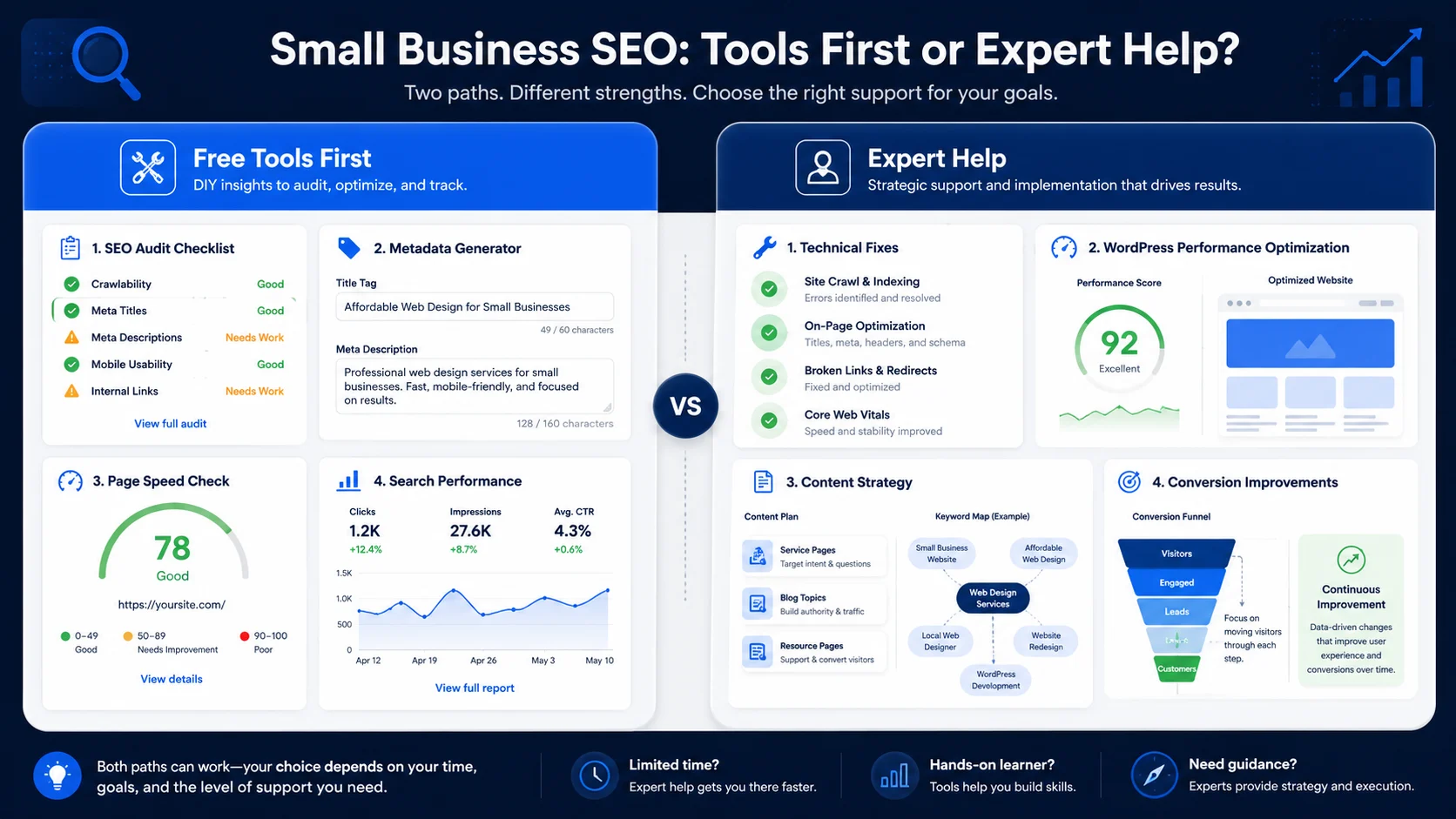
Use free tools when you need to:
- Check common website issues.
- Improve a few titles and descriptions.
- Review product listing copy.
- Understand basic search performance.
- Find quick SEO wins.
Get expert help when you need to:
- Fix technical SEO errors.
- Improve WordPress speed and Core Web Vitals.
- Plan a full content strategy.
- Restructure website pages.
- Fix indexing problems.
- Improve conversion paths and calls to action.
Need implementation support? If the tools show issues you cannot fix alone, XealBrax can help with SEO, WordPress performance, metadata, product pages, and visibility strategy.
Recommended XealBrax SEO Tool Workflow
Use this simple workflow when reviewing a small business website:
- Start with the SEO Audit Tool: check technical, metadata, speed, image, and link issues.
- Review Google Search Console: look for impressions, clicks, CTR, indexing, and query data.
- Use the Meta Tag Generator: improve weak titles and descriptions.
- Use the Product Listing Optimizer: improve product titles, descriptions, and listing clarity.
- Check speed: review mobile performance and Core Web Vitals signals.
- Improve internal links: connect blog posts, tools, services, product pages, and community pages naturally.
- Get help when needed: use XealBrax Services or book a strategy call for technical or strategic work.
Helpful Free SEO Tool Resources
For deeper guidance, review trusted documentation alongside your tool results. Google’s SEO Starter Guide explains common improvements that help search engines crawl, index, and understand content. Google’s Search Console Performance report documentation explains clicks, impressions, CTR, and position. Google’s PageSpeed Insights documentation explains performance signals and Core Web Vitals.
Use these resources with the XealBrax free SEO and AI tools to build a clearer small business SEO workflow.
FAQ: Free SEO Tools for Small Businesses
What are the best free SEO tools for small businesses?
Useful free SEO tools for small businesses include a website SEO audit tool, Google Search Console, PageSpeed Insights, a meta tag generator, a product listing optimizer, keyword research tools, image SEO checks, sitemap and indexing checks, and local visibility tools.
Can free SEO tools replace an SEO expert?
Free SEO tools can help identify issues and guide basic improvements, but they do not fully replace expert help for technical implementation, content strategy, WordPress performance, indexing problems, or conversion optimization.
Which SEO tool should a small business use first?
Most small businesses should start with a website SEO audit tool because it gives a broad view of title tags, meta descriptions, headings, speed, links, images, indexing, and technical SEO issues.
How often should a small business run an SEO audit?
Run an SEO audit before publishing major pages, after website changes, after a redesign, and whenever traffic or leads drop unexpectedly. A monthly check is useful for active business websites.
Are free SEO tools enough for product pages?
Free SEO tools can help improve product titles, descriptions, metadata, images, and technical checks, but larger stores may need deeper product SEO, structured data, category strategy, and conversion review.
When should a small business get expert SEO help?
Get expert help when the same issues keep returning, when technical fixes are unclear, when the website is slow, when pages are not indexed, or when your site gets traffic but few leads or sales.
Start With Free SEO Tools, Then Fix What Matters
Use free tools to understand your website, then improve titles, descriptions, product listings, speed, indexing, and visibility step by step.

A Personal Note From Collins E. Iyorah, Founder of XealBrax
I built XealBrax because creators, bloggers, and small businesses shouldn’t have to piece together fragmented tools to grow online. Whether you are optimizing your website performance, utilizing our AI-driven utilities, or scaling through our Creator Network, our goal is to give you a transparent, penalty-free path to digital success. If you want a complete look at how we help brands scale, read my personal guide to get started.